How to use Canvas Padding and Square Fit
- Choose your image in the Image field.
- Set Canvas size to a square, another ratio, or Enter width and height.
- Pick an Image position to place the picture inside the new canvas.
- Choose a Padding background, and a Solid color if you picked solid.
- Select Add the padding, then download the padded file.
Example: Canvas Padding and Square Fit
Fit a 512 by 512 PNG into a 600 by 600 canvas.
Options
- Canvas size
- Ratio modes build the smallest whole-pixel canvas of that ratio that holds the whole image. A 1200 by 800 picture on 4:3 gives 1200 by 900. Enter width and height uses your own numbers instead.
- Fit the image down if the entered canvas is smaller
- Only applies to an entered size. The picture is scaled down to fit inside and keeps its shape. Nothing is cropped.
- Image position
- Center splits the free space evenly between opposite sides. Another position pushes all of it to the sides you leave.
- Padding background and Solid color
- Transparent needs PNG or WebP, because JPEG cannot store transparency, so a JPEG export needs a solid background. The color field takes six hex digits such as #ffffff.
- Frame style
- Choose Solid, Rounded or Patterned and set the frame size and color. Stripes, dots and checks are available. The preview and exported image use the same frame drawing.
Supported inputs and limits
Where your input is processed
This tool processes your input in this browser. Your text and files are not uploaded to UseFreeTools. Check this tool's limits for anything it may save on your device.
How the ratio canvas is chosen
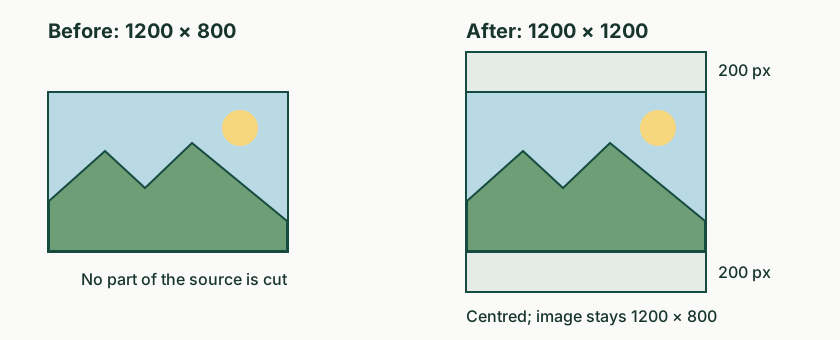
A ratio mode builds the smallest whole-pixel canvas of that ratio that still contains the picture. A 1200 by 800 picture is wider than 4:3, so the canvas has to grow in height until the width matches: 1200 by 900, which leaves 50 pixels above and 50 below. On a square canvas the same picture needs 1200 by 1200, which leaves 200 pixels above and below.
Questions about Canvas Padding and Square Fit
How do I make a photo square without cutting it?
Choose Square around the whole image and leave Image position on Center. The whole picture stays visible and the extra space is added above and below, or to the left and right, depending on the shape of the source.
Why was my canvas refused?
It was smaller than the picture on at least one side. Enter a larger canvas or turn on fit-down, which scales the picture down to fit. The tool never crops to make the numbers work.
Why does 4:3 give 1200 by 900 instead of 1600 by 1200?
The ratio modes pick the smallest whole-pixel canvas of that ratio that still holds the picture, so the padding stays as tight as the ratio allows instead of jumping to a much larger frame.
Can I add a white border to a JPEG?
Yes. Choose a Solid color background and set the value to #ffffff. Transparent padding is not accepted for JPEG output, because the format has no alpha channel.